See traffic with context
Check IP, classification and reasons for visits recorded by your monitoring link.
INTELLIGENCE AGAINST INVALID CLICKS
You invest to win customers. Shield Clicks helps you understand who arrives through your ads and spot the visits that deserve attention.
Traffic monitoring for Google Ads accounts.
192.0.2.18Legitimate browsingValid198.51.100.42Risk signalsSuspicious203.0.113.86Repeated visitsBlockedDemo preview with sample data.
01 / VISIBILITY THAT MATTERS
Bring together the signals that separate a legitimate visit from one worth investigating.
A risk signal calls for context. Classification supports your review.
Check IP, classification and reasons for visits recorded by your monitoring link.
Follow connected Google Ads accounts and filter data by the domain you are reviewing.
Review queued IPs and, when it makes sense, send the exclusion to Google Ads with a manager action.
THE DASHBOARD IN DETAIL
Current product UI, filled with fictional demo data.
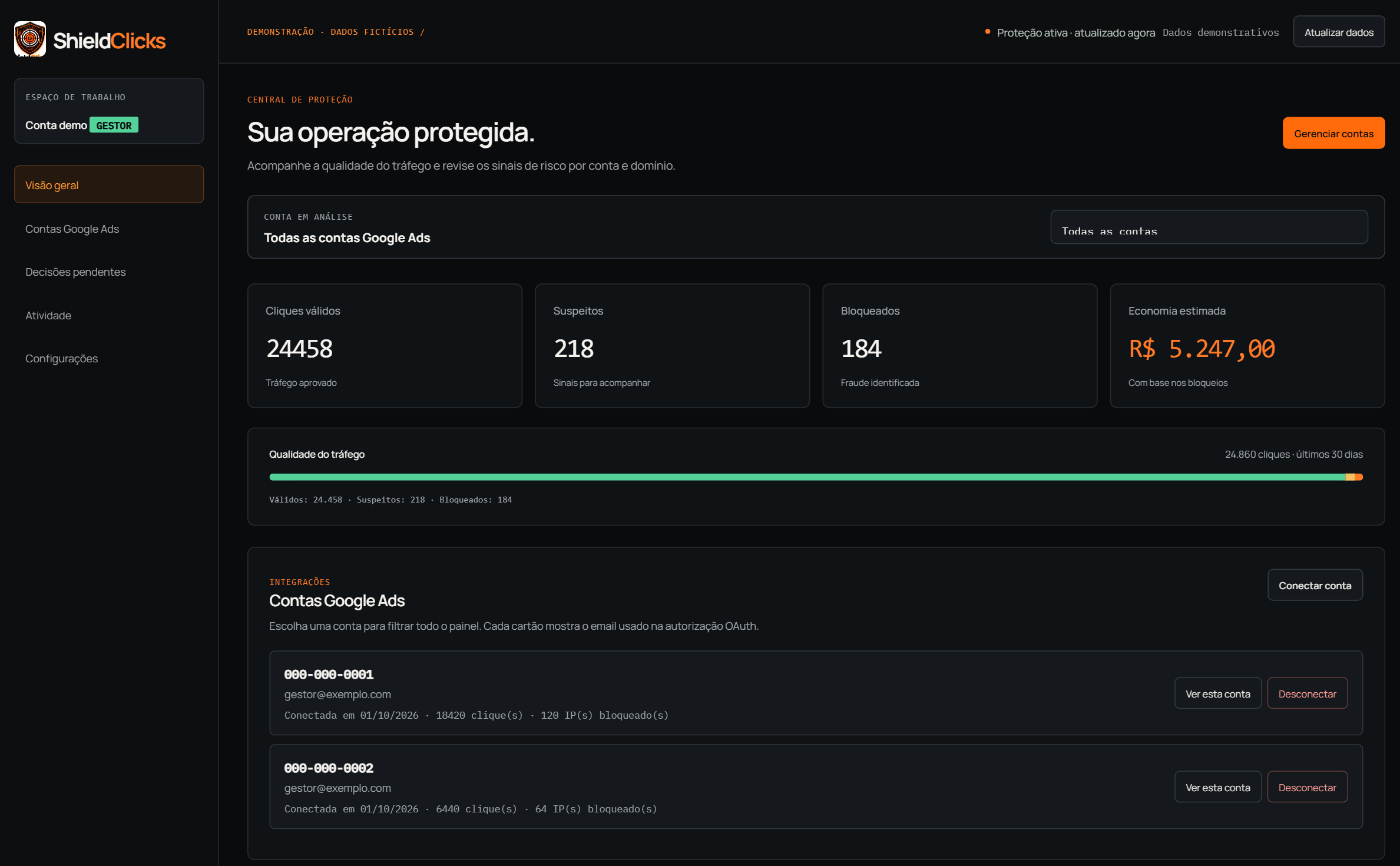
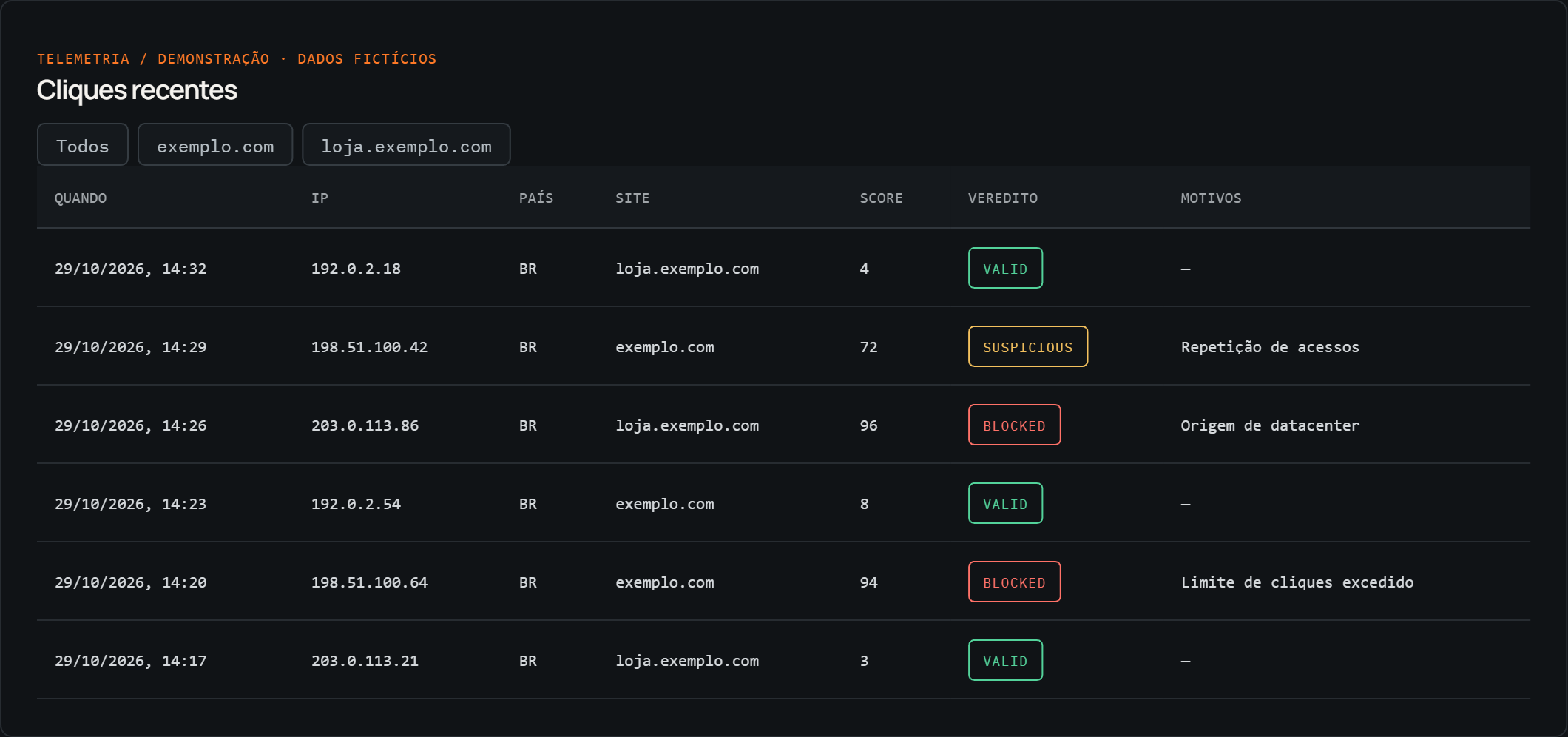
Sample data, accounts and values. The estimated cost shown is illustrative and is not proven savings or a refund.
02 / FROM CONNECTION TO DECISION
Authorize access to the accounts you manage through the Google connection flow.
account → connectedSet up the monitoring link for authorized domains and follow recorded clicks.
click → analysisSee the classification and risk reasons. Review queued IPs before sending an exclusion to Ads.
context → decisionPROTECTION WITH VISIBILITY
Shield Clicks organizes the review. Exclusion decisions in Google Ads stay with you.
SHIELD CLICKS / TRAFFIC CONTROL03 / PICK YOUR OPERATION
From your first account to an agency operation. Pick the plan for your moment.
MORE ACCOUNTS, SAME VISIBILITY
For companies and managers following several accounts.
R$ 299/mo
Choose ProFOR AN EXPANDED OPERATION
For agencies managing client accounts.
R$ 599/mo
Choose Pro MaxMonthly prices. Confirm contracting terms and your plan's click volume with the team. Billed in BRL (Brazilian real).
04 / NO LOOSE ENDS
Learn how it works and which access you need to use Shield Clicks.
Talk to the teamThe system records visits through the monitoring link and checks signals such as IP traits and click repetition. The dashboard gathers the classification and reasons for each record to support your review.
No. The system queues IPs classified as blocked for a decision. Sending an exclusion to Google Ads requires a manager action in the dashboard. Click classification and the Ads exclusion are separate steps.
Authorization locates the Google Ads accounts you can access, reads data used in the dashboard, and sends IP exclusions on request. The connection uses Google's authorization flow; you never share your password with Shield Clicks.
Yes. Pro supports up to 20 Google Ads accounts and Pro Max up to 50. Connected accounts are available for individual review in the dashboard.
No. Shield Clicks supports monitoring and visit analysis. Invalid-traffic assessment for billing and any credits or refunds are Google's responsibility.
Pick a plan on the signup page, fill in your operation details, and finish payment at checkout. After confirmation, the team creates your access and emails the invite to connect accounts and set up the monitoring link.
READY TO LOOK CLOSER?